
In our last post, we set a plan for the month: savings first, then needs, then wants, with one number for each category. (If you skipped it, start with Needs vs Wants: Plan Where Your Money Should Go Before You Track It.) The plan tells you where you’re going. Tracking tells you whether you’re still headed there.
This post is the tracking half. It’s a routine you can keep up without connecting a bank account to anything: a minute or so a day, 5 to 10 minutes a week, and a short catch-up once a month.
Why track without linking a bank?
Linking a bank brings in card spending automatically, and that’s handy. But it can’t see everything, and the biggest gap for us is cash.
Say you take $200 out of an ATM. Your bank records one line: ATM withdrawal, $200. Over the next week, that cash turns into lunch and coffee, a parking meter, a farmers market run and a birthday gift. None of that shows up in a bank feed. All it knows is that $200 left your account, so it can’t tell you that $60 of it was a want and $40 was groceries.
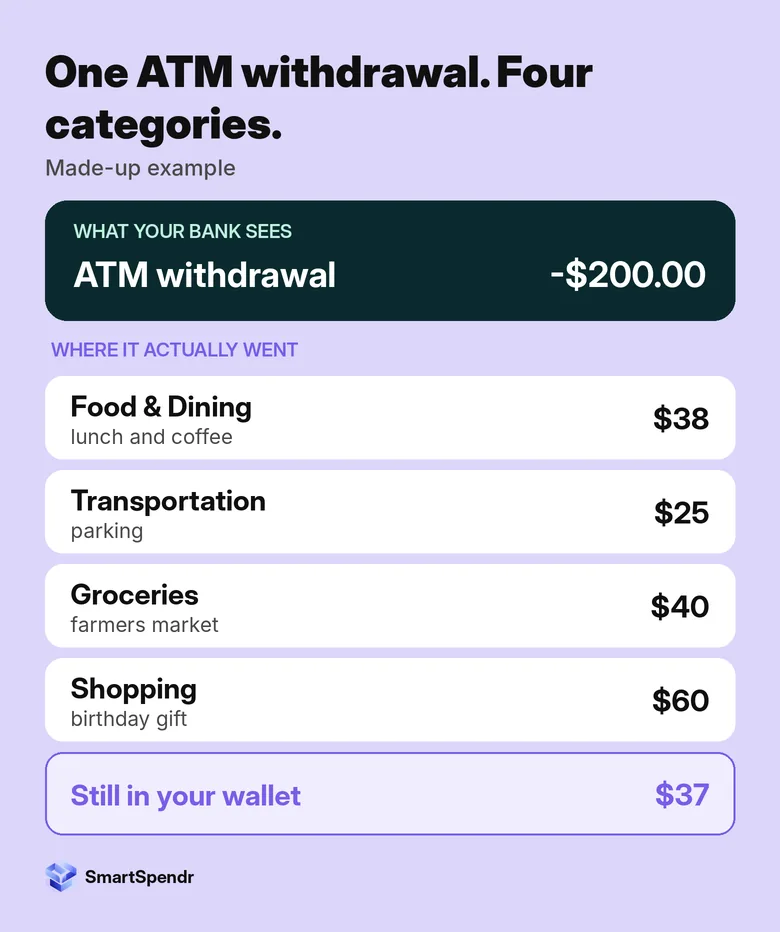
The only way to put that cash into the right categories is to record it yourself. Once you’re doing that for cash, it’s a small step to log everything the same way. There are other reasons people skip linking too: they’d rather not share a bank login with an app, they use several cards, or they simply want to decide how each expense is labeled.
SmartSpendr works this way. There’s no bank login, and the app doesn’t move money or touch your accounts. You add records yourself, or import a statement on Pro.
The 3-part routine
Here’s the whole routine at a glance. Each part takes very little time; what matters is doing all three.
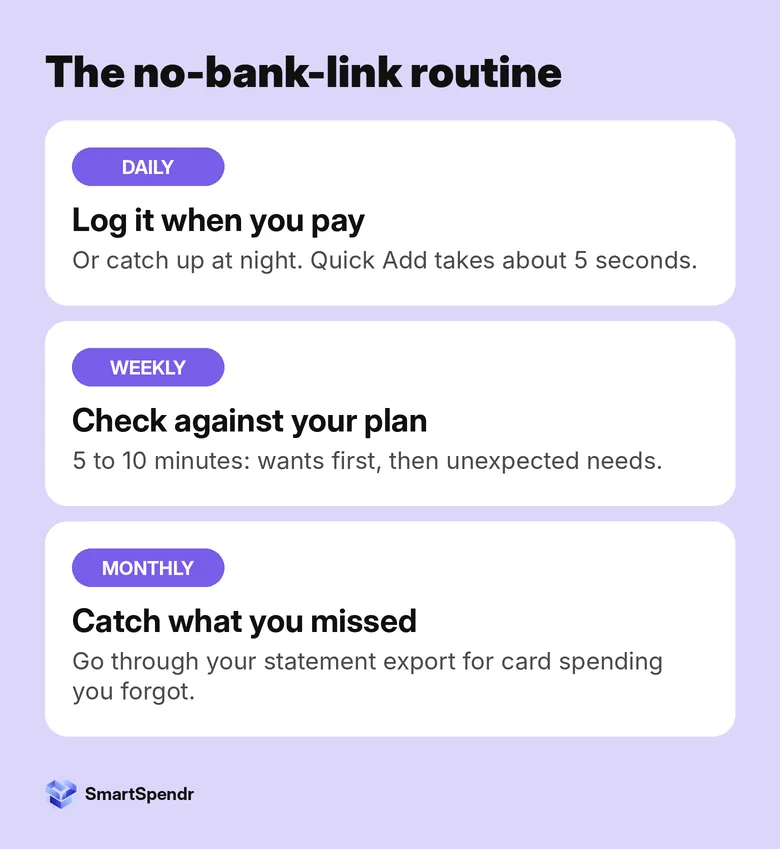
Daily: log it when you pay (or catch up at night)
Log each expense right after you pay, or set aside a minute at night to add the day’s spending in one go. Either works. What matters is that the records stay close to your plan, so if something starts heading the wrong way, you notice it while it’s still easy to fix.
Quick Add in SmartSpendr takes about 5 seconds per expense: amount, category, account. Cash counts too, so that $200 withdrawal becomes four records in four categories instead of one mystery line. If you tend to forget, turn on the daily reminder to log your expenses.
Want to try it? SmartSpendr is free on iOS and Android.
Weekly: a 5 to 10 minute check against your plan
Once a week, put your records next to your plan. This is the step that makes tracking worth doing, and it’s short. We sometimes do it more than once a week, especially in a busy month. Below is what we look at.
Monthly: catch what you missed
Even with a daily habit, a card payment or two will slip through. Once a month, download your statement and go down the list. Anything you didn’t log, add now. On Pro, you can import a statement directly (CSV, Excel, QIF, PDF or a photo), check the parsed records and then save them. Our 30-minute subscription audit uses the same statement export, so you can do both in one sitting.
What to look at in your weekly check
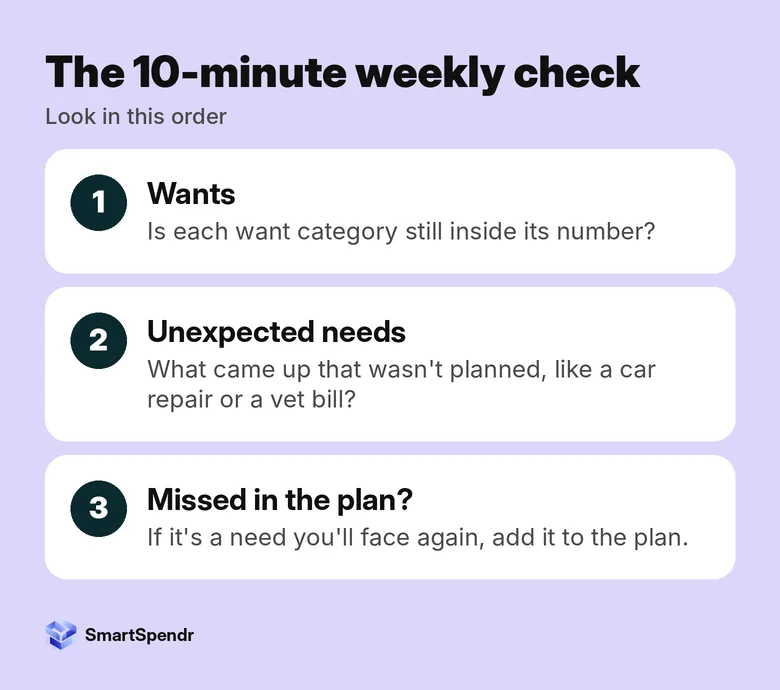
We check things in this order:
- Wants first. Is each want category still inside the number you gave it? Wants are where a plan usually slips, and they’re also the easiest to pull back for the rest of the month.
- Unexpected needs next. What came up that you didn’t plan for? A car repair, a vet bill, a prescription. They happen to everyone, and each one tells you something about your plan.
- Was it a need you missed? If an unexpected need is something you’ll face again, like a yearly car registration, it belongs in the plan. Add it to next month’s plan so it isn’t a surprise again.
In SmartSpendr, the category chart on the dashboard shows each category’s share of your total spending, and you can set a budget for each category on the free plan. Between the two, you can see in a few minutes which “want” is running ahead. If you’re not sure where your money tends to leak, our 7-day overspending test is a good place to start.
Why tracking stops, and small fixes
- You missed a few days and gave up. Don’t try to remember every coffee. Log what you can, and let the monthly statement catch-up fill the gaps for card spending. Cash is the part to log the same day.
- Too many categories. If picking a category takes longer than paying, merge some. A handful of clear categories is easier to keep up than twenty.
- The records don’t mean anything. That usually means there’s no plan to compare them with. Go back and set one number per category first.
- The weekly check keeps getting skipped. Tie it to something you already do each week, like Sunday laundry or the commute home on Friday.
Start this week
- Write down your plan, or check last month’s: one number per category.
- Log every expense this week, cash included, as you pay or at night.
- Pick a day for your 5 to 10 minute check: wants first, then unexpected needs.
- If a need surprised you, add it to next month’s plan.
- At the end of the month, go through your statement for anything you missed.
SmartSpendr is free on iOS and Android. Log an expense in about 5 seconds, set a budget for each category, and see each category’s share of your spending, all without linking a bank. Get SmartSpendr at smartspendr.app.
This post is for education only and isn’t financial advice.
3 thoughts on “How to Track Expenses Without Linking Your Bank (Once You Have a Plan)”
Comments are closed.